UZLIN Build Labedu.uzlin.com

Computer Science and Robotics for ages 15 and up, in Yerevan

Code it.Wire it.Make it think.

Two hands-on courses, Computer Science and Robotics, taught on the Raspberry Pi Pico by the engineer behind AgroMon and SmartSell POS. Students don’t just learn about technology. They build it.

  • No experience needed
  • Small groups, real hardware
  • Taught in Armenian, Russian or English
A Raspberry Pi Pico circuit board: its left pins lead to Computer Science topics, its right pins to Robotics topics. RP2350 2 × 150 MHz PICO 2 W ComputerScience Robotics ArchitectureCPU, memory, binary NetworksWi-Fi, encryption Databasessensor data to SQL AI and MLtrain, test, check bias Armservos, phone control BalanceIMU, PID control Walkingkinematics, gaits VisionROS 2, simulation

From the team behindWe teach the technology we build every day.

  • AgroMonSmart irrigation for Armenian farms
  • SmartSell POSPoint of sale for Armenian shops
  • TrackSafeNFC and GPS safety for student transport

Two courses on one board. Take one, or both.

Each course stands on its own, and the two are designed to fit together. Both run on the same Raspberry Pi Pico, so what students learn in one powers what they build in the other.

Course 1

Computer Science

How computers really work, from binary to artificial intelligence.

Age
15+
Length
3 levels
Level
Beginners welcome

What students learn

  • Computer fundamentals and how data is stored
  • Computational thinking and Python, up to object-oriented programming
  • Networks and security, from IP addresses to encryption
  • Databases and SQL
  • Machine learning, from regression to neural networks, and its ethics
  • Algorithms and data structures: searching, sorting, trees and hash tables

What they build

A sensor data logger, a secure connected device, a machine-learning classifier, and a final project that solves a real problem.

How progress is measured

Projects and practical tests, and an assessment at the end of each level that decides whether the student continues. The course ends with a final project and an ethics review.

Course 2

Robotics

From a blinking LED to a walking robot that sees.

Age
15+
Length
5 levels, 40 weeks
Level
No experience needed

What students learn

  • Electronics, soldering and working safely
  • Servos, motors and batteries
  • Sensors, filters and feedback control (PID)
  • Control from a phone over Wi-Fi and Bluetooth
  • Kinematics, CAD and 3D printing
  • ROS 2, simulation and computer vision

What they build

Robots of their own to keep: a phone-controlled robotic arm, a self-balancing robot and a two-legged walking robot. In the last level, they simulate their robot and give it vision.

How progress is measured

A working demo and an assessment at the end of each level. The assessment result decides whether the student continues to the next level.

Better together. The robot a student builds in Robotics can become their Computer Science final project.

Real projects, from real products to walking robots.

Computer Science projects are smaller versions of systems UZLIN engineers have built for Armenian clients. Robotics projects grow level by level, from an arm to a robot that walks. Students finish with working devices and a portfolio to show for them.

Computer Science

Smart irrigation controller

Reads soil moisture, waters plants on its own and sends every reading to a database and a live web dashboard.

Inspired by AgroMon

Robotics

Phone-controlled robotic arm

A 3D printed arm that records and replays movements, picks up objects it detects and takes commands from a phone.

Built in Level 1

Computer Science

NFC check-in system

Tap a card to record who arrived and when, with a privacy review built in.

Inspired by TrackSafe

Robotics

Walking robot

A two-legged robot students design in CAD, print and teach to walk, then test in simulation with a camera.

Built in Levels 3 and 4

Not another coding class.

Hardware from the first lesson

Every idea runs on a real Raspberry Pi Pico. A bug isn’t a red underline, it’s a robot that won’t move. That is why it sticks.

Taught by a working engineer

The instructor designs commercial IoT and software products and lectures at university, so students learn how technology is built in the real world, and what university will expect of them.

Projects with a purpose

Every build is modelled on a product used in Armenia, from farms to shops to school transport.

A portfolio, not just a grade

Students leave with working devices, their own code and an engineering logbook they can show schools and universities.

Taught by the engineer who builds the products.

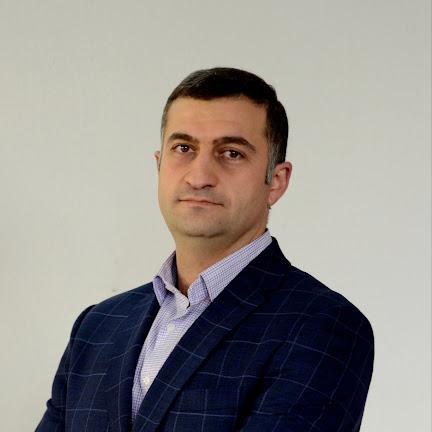
Both courses are written and taught by Narek Tigranyan, a university lecturer and computer science teacher who is also the founder and CTO of UZLIN Technologies.

Narek Tigranyan

Narek Tigranyan

Founder and CTO, UZLIN Technologies
University lecturer

Teaches in Armenian, Russian and English

More than 11 years building software and hardware, and teaching the next generation to do the same.

  • University lecturerTeaches Python programming, and digital manufacturing and computer science with a focus on robotics. The Robotics course follows the same path.
  • Computer Science teacher, since 2022Teaches pre-university computer science in English.
  • Head of a school technology department, 2021–2026Led a school’s technology department and IT centre, and founded its integrated robotics education programme.
  • Founder and CTO, UZLIN Technologies, since 2018Architect of AgroMon, SmartSell POS, Dandan Armenia and the TrackSafe student transport safety system.
  • Founder and CEO, New Web Development, 2014–2018Grew a web studio into a software company building business automation, CRM, warehouse and mobile apps for clients in Armenia and abroad.
  • Embedded systems and digital manufacturingBuilds with Arduino, Raspberry Pi and Raspberry Pi Pico, and took part in a professional programme in China on digitalising manufacturing.
  • Curriculum authorWrote school syllabuses in Computer Science (data science, cybersecurity, digital citizenship) and Robotics (microcontrollers, input and output devices, embedded software).
  • Published researcherAuthor of a scientific article in the “European University” collection.

The projects in these courses are scaled-down versions of systems he has designed for real clients in Armenia.

What’s on the desk

Students work with the same kind of components UZLIN uses in its own products.

  • Raspberry Pi Pico 2 WDual-core microcontroller with Wi-Fi and Bluetooth
  • Sensor setTemperature, humidity, soil moisture, light and motion
  • ActuatorsRelay, servo, RGB LEDs and buzzer
  • NFC / RFID readerFor identity and check-in projects
  • Prototyping setBreadboard, wires, resistors, buttons and a small display

Robotics adds

  • Servos and a 3D printed robotic arm
  • Gear motors with encoders, a motor driver and a LiPo battery
  • Motion (IMU), distance, light and environment sensors
  • Raspberry Pi 5 with a camera for the final level

Software: MicroPython and Thonny. Both are free and run on Windows, macOS and Linux.

Bring Build Lab to your school.

Both courses can run at your school or makerspace, and they pair naturally with Armath engineering labs.

  • A complete scheme of work and lesson materials
  • Teacher training by the course author
  • Kits and set-up for your lab
Talk to us about your school

Questions parents ask

Does my child need any experience?

No. Both courses start from the basics. Robotics begins with simple circuits, and Computer Science teaches Python from the first line of code.

Who are the courses for?

Students aged 15 and up who are curious about how technology works. The courses suit complete beginners and also stretch students who already code.

Does my child keep the robots?

Yes. In Robotics, each student finishes Level 1 with their own robotic arm, Level 2 with their own self-balancing robot and Level 3 with their own two-legged walking robot.

What happens at the end of each level?

Each level ends with an assessment. Its result decides whether the student continues to the next level, so everyone moves on with the skills the next level needs.

Can my child take both courses?

Yes. They are designed to fit together: the robot built in Robotics can become the Computer Science final project.

What language are classes taught in?

The instructor teaches in Armenian, Russian and English. Tell us your preference when you book.

What will my child have at the end?

Working devices they built themselves, their own code, an engineering logbook and a portfolio of projects to show schools and universities.

Will this help my child at university?

Yes. The instructor also lectures at universities in Python programming, and digital manufacturing and computer science with a focus on robotics, so the courses build the skills first-year students are actually expected to have. Students also finish with a project portfolio they can use in their applications.

Is this exam preparation?

No, it is project-based learning. The Computer Science course covers the core topics of pre-university computer science, so it also builds a strong foundation for school exams and further study.

Where and when are the classes?

Classes take place in Yerevan. Contact us for the current schedule and location.
Book a trial lesson

Tell us the student’s age and which course interests them. We’ll suggest the right group and a time for the first lesson.

Book a trial lesson Call